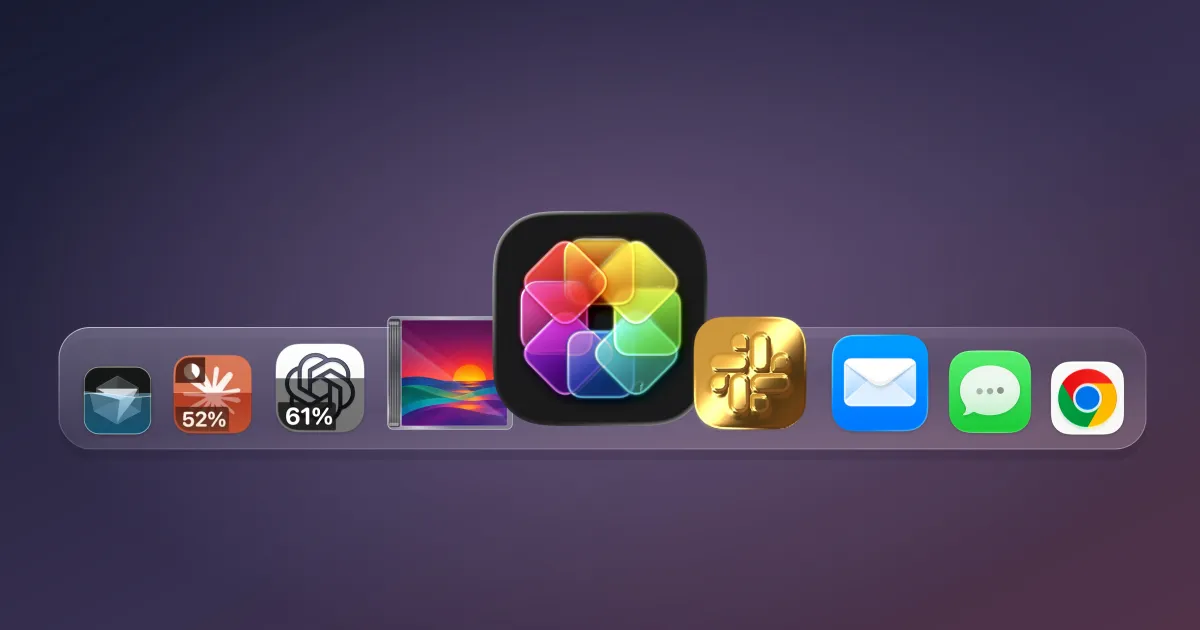
A new Mac utility allows users to monitor their artificial intelligence tool usage directly through customizable application icons. The tool, named IconSwapper, was developed by Copenhagen-based designer Michael Flarup and offers a visual way to track limits and activity for popular AI platforms like ChatGPT, Claude, and Cursor.
According to Flarup, the application works by replacing standard system icons with custom versions that display live data. While the primary utility is tracking AI quotas, the software also supports built-in macOS applications such as Safari, Finder, and Messages. Users can configure these icons to react to system events, such as having the Finder icon’s eyes follow the cursor or the Safari compass respond to page loads.
The technical implementation of IconSwapper involves a workaround for macOS’s lack of official icon theming support. Flarup developed a method that draws directly onto icons without replacing the underlying system files, utilizing custom Metal shaders to render artwork in real time. The renderer sends bitmap data to the Dock, allowing the custom graphics to maintain stability during interactions like Dock magnification and application switching.
“The breakthrough was figuring out how to send the Dock a bitmap for another running app and have it draw that frame itself,” Flarup stated. “I spent a lot of time getting the artwork to follow the icon through all the little ways macOS moves it… Once I had that working, I could make the icon react to whatever’s happening.”
Flarup, who has been designing Mac icons since the early 2000s and wrote a book on app icon design, aims to make personal software interfaces more engaging. The app is currently available as a one-time purchase for $19 as a promotional launch price, with a standard price of $29 planned for the future.



Does this work with external monitors, or only the main display? I am curious about performance.
The Metal shader workaround is impressive. It is wild that Apple still makes this so hard for users.
Spend nineteen dollars just to make your Dock look cool? I have better uses for my money, honestly.